Almost every production voice agent is built on a cascaded architecture STT → LLM → TTS coordinated by an orchestrator like Pipecat, LiveKit Agents, or Vapi. Once STT signals the turn has ended, the orchestrator sends the transcript to the LLM, and the LLM’s output is then sent to TTS to generate the audio.
Every turn makes a request to the LLM over a network connection, and whatever that connection costs is added straight onto the turn’s delay. In voice, latency is important as people notice anything past 500 ms. If the LLM client is not optimized, this connection overhead could effectively double TTFT in worst case. This post is about optimizing this network overhead.
The Problem: A New Connection on Every Turn
Before your first http request, the client and server complete a TCP handshake and then a TLS handshake which is multiple round trips. If the GPU region is farther, for ex., a call from EU to US west would be ~250 ms just for the handshake every turn.
If we use the standard OpenAI client, a fresh TCP + TLS handshake happens on almost every turn. This is because the client defaults to HTTP/1.1 with a short keepalive, tuned for its original chat use case.
Conversational gapshttpx reaps idle connections after its keepalive_expiry which is 5 sec default for Open AI client. But voice turns are seconds apart as TTS plays for few secs, then the user speaks, then STT transcribes and by the time the next LLM call fires, the 5-second window would more often than not be lapsed and the connection is gone. The agent re-handshakes on a conversation that never actually stopped.
HTTP/1.1 can’t multiplex: one connection carries one request at a time. So every concurrent call opens its own connection, each with its own TLS handshake. This will saturate the connection pool so further calls queue, and eventually run into server connection limits or added latency.
The Fix: Hopper Client
hopper-client is a drop-in replacement that fixes this by keeping one warm connection alive across turns.
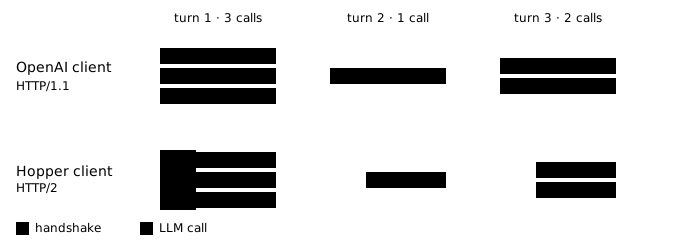
The Hopper client ships an httpx transport tuned for voice: HTTP/2 on, a long keepalive, and a small pool. With HTTP/2, a single connection multiplexes many streams, so concurrency no longer creates more connections, and the connection stays warm between turns instead of being reaped in the gap.
| Setting | OpenAI default | Hopper default | Why it changes |
|---|---|---|---|
http2 | off | on | One connection multiplexes many streams and stays reusable across turns. |
keepalive_expiry | 5 s | 300 s | Spans normal conversational gaps so the next turn reuses the connection instead of re-handshaking. |
max_keepalive_connections | 100 | 20 | With HTTP/2 one connection carries many streams, so the warm pool stays small. |
connect timeout | 5 s | 3 s | Fail a bad connection fast so the caller can retry or hedge instead of stalling a live turn. |
read / write / pool | 600 s | 60 s | The per-chunk gap that bounds TTFT. |
Results
We measured both clients against the same inference endpoint and replayed the situations above. The model and target are identical, so the difference in TTFT is only the network connection cost.
| Scenario | Calls | OpenAI conns | Hopper conns | OpenAI TTFT | Hopper TTFT |
|---|---|---|---|---|---|
| gaps — pauses between turns | 7 | 7 | 1 | 510 ms | 197 ms |
| concurrent — 20 concurrent sessions | 61 | 61 | 1 | 600 ms | 319 ms |
Median TTFT roughly halves, to about 197 ms with conversational gaps and 319 ms under concurrency.
Usage
pip install hopper-clientfrom hopper import AsyncHopper
# initialize once, at startup — reused for every turn
client = AsyncHopper(base_url="https://api.withhopper.com/v1", api_key="sk-...")
async def handle_turn(messages):
return await client.chat.completions.create(
model="Qwen/Qwen3.6-35B-A3B", messages=messages, stream=True)Everything else is the OpenAI SDK you already use. The source and benchmark script are on GitHub.